Your Mac listens only to your phone
At home Remolo works directly, and over the internet only with your own devices and the guests you let in. The first connection needs the code from your Mac’s screen or a one-time link, every connection is end-to-end encrypted, and there are no accounts.
Updated
At home, directly
Phone and Mac find each other on your Wi‑Fi or without a router and talk only to each other. Over the internet (Pro), through a relay that only sees ciphertext and stores nothing.
A code or a one-time link
Your Mac shows six digits or a QR code, and when the phone is far away it gives a one-time link with a 256-bit secret and the Mac’s key. The code changes after five wrong tries, and a link burns on the first wrong one. Phone and Mac verify each other, so nobody can pretend to be your Mac.
End-to-end encryption
Every connection is encrypted with modern cryptography (Curve25519, ChaCha20‑Poly1305), keys are new for each session, and an intercepted command cannot be replayed.
Your Mac stays in charge
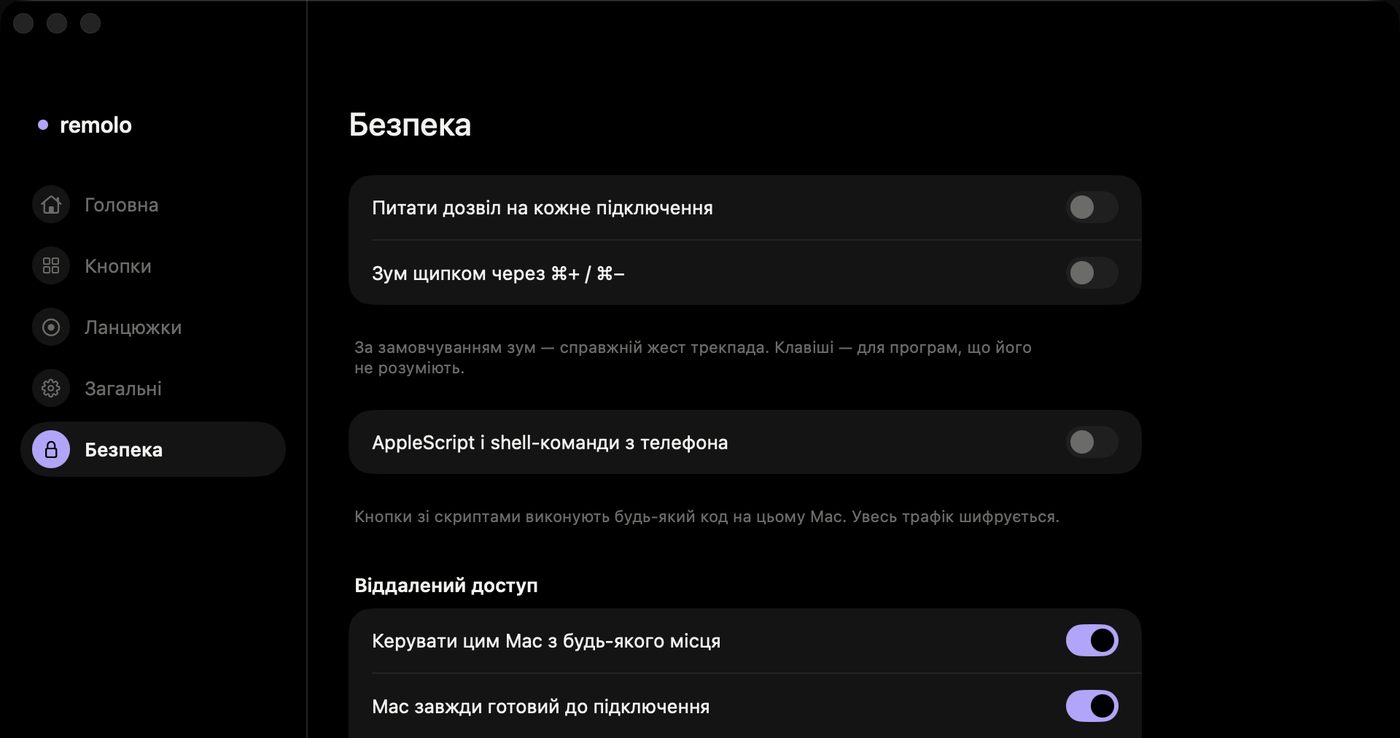
Trusted phones and guests are listed in the menu bar, and any of them can be disconnected or forgotten. You can require approval for every connection, and one click pauses control and the Mac’s screen — the phone shows it.
A guest gets only what you tick
Temporary access for an hour, a day or a week: trackpad and keyboard, slides, media or the Mac’s screen. Files, the clipboard, the terminal and button actions — never. The Mac itself enforces the rules.
We never read passwords
The text mirror shows what is in the Mac’s active text field, but Remolo never reads password fields at all, and what password managers mark as concealed never reaches the shared clipboard.
Scripts are off
AppleScript and Shell buttons and the Terminal mode can do anything, so they are off on the Mac by default. They can only be turned on in the Helper’s security settings on the Mac itself.
Questions
Can someone in a café control my Mac?
No. To connect for the first time you need the code shown on your Mac, or a one-time link from its menu. After five wrong tries the code changes. And every connected phone is listed in the Mac’s menu bar.
How safe are links for a guest or for my own iPhone?
A link works once: as soon as it is used, it is gone. The secret in it is 256 bits, and the first wrong attempt burns it. An unused link lasts a day at most (a guest link, never longer than the access itself). It carries your Mac’s public key, so the phone talks only to that Mac, and they meet in a separate temporary relay room, never your Mac’s own. The page that opens it keeps the secret after the “#”, so the server never receives it. Send links only to people you trust.
What can a guest do?
Only what you tick — trackpad and keyboard, slides, media, the Mac’s screen (off until you turn it on) — and only until the time is up: an hour, a day or a week. Files, the clipboard, the terminal, button actions and scripts, sleeping and locking the Mac, quitting apps and your button profiles are never available to a guest. The Mac itself checks every command from a guest, and “End access” in the menu disconnects them at once.
What does Remolo know about me?
Next to nothing. There are no accounts or ads, and your phone’s name and the encryption keys stay on your own devices. We only receive the “Something wrong?” reports you send (anonymous, kept 180 days) and crash reports only with your consent. Details in the privacy policy.
And access over the internet?
You turn it on yourself, with one button on the Mac. Then the phone and Mac can connect through the Remolo relay on Cloudflare, but the data is encrypted on the devices: the relay only sees ciphertext and stores nothing. Only devices already paired with the Mac by code or one-time link, and guests with valid access, can connect.
Why does the Mac ask for Accessibility?
It is the system permission without which no app can move the cursor or press keys for you. Remolo uses it only for commands from your phone and never reads password fields.
How do I remove an old or unknown phone?
Remolo icon in the menu bar → gear → Devices → Forget. That phone cannot connect again without a new code or link.
Found a vulnerability? Write to hello@remolo.app.