Remote desktop for a Mac from iPhone and iPad: Remolo and the alternatives
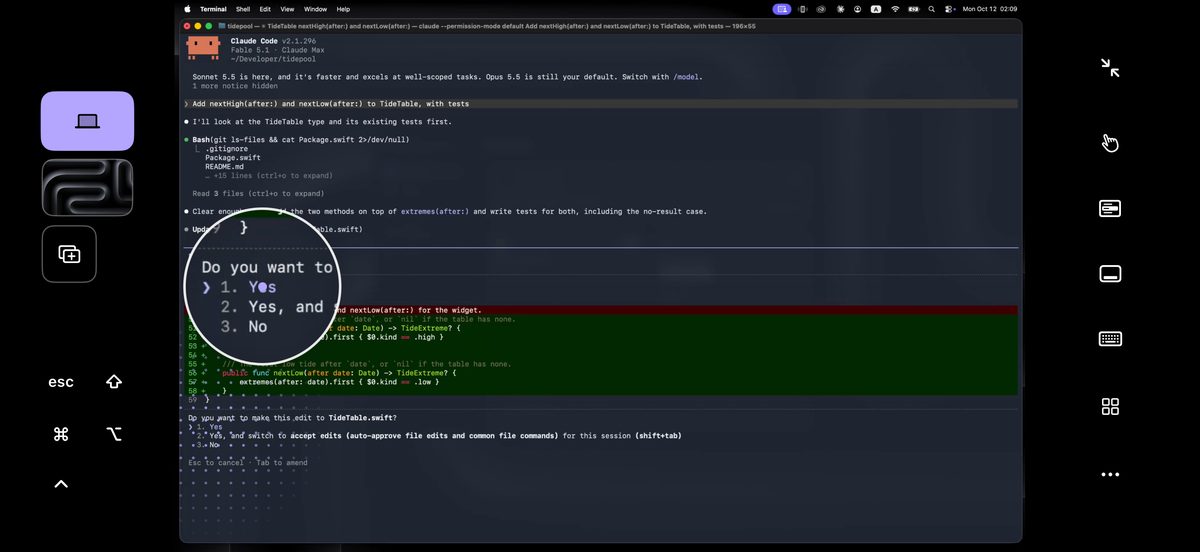
If you control a Mac from an iPhone or iPad and want to tap the Mac’s screen like your phone, pick Remolo: turn the iPhone on its side, the Mac’s screen fills it, a tap is a click, two fingers open the Mac’s context menu, and there is no account — just a QR code. If you also have Windows or Linux, support many computers or control from another Mac, Jump Desktop, Screens 5, TeamViewer, AnyDesk or the built-in Screen Sharing is the better choice. Remolo is a remote desktop app for the Mac, made for touch on iPhone and iPad (version 1.4, October 2026): free at home for one Mac, and from anywhere for 10 minutes a day or unlimited in Pro at $3.99/mo or $19.99/yr.
Updated
Remote desktops
| Remolo | Jump Desktop | Screens 5 | Chrome Remote Desktop | TeamViewer | AnyDesk | macOS Screen Sharing and Apple Remote Desktop | |
|---|---|---|---|---|---|---|---|
| Price | free for one Mac; Pro $3.99/mo or $19.99/yr | $14.99 once on iPhone; $34.99 for the Mac app | $3.99/mo, $29.99/yr or $199.99 lifetime | free | free for personal use only; paid plans for work | free for personal use; paid plans for work | built into macOS; Apple Remote Desktop is $79.99 for Mac |
| iPhone app to control a Mac | yes; made only for a Mac from iPhone and iPad | yes | yes; also for Mac and Vision Pro | — the app is gone from the App Store; only the remotedesktop.google.com website | yes, TeamViewer Remote Control | yes, AnyDesk | — Apple has no such app; only third-party VNC clients |
| Windows or Linux computers | no, Mac only (macOS 15+) | yes: Windows and Mac; Linux in alpha | yes: Windows, Linux and Raspberry Pi with a VNC server | yes | yes | yes | Macs only; Apple Remote Desktop also controls VNC computers |
| Touch on the phone | you touch the Mac’s screen directly, like your phone: tap to click, slide to scroll, hold and drag windows and files; a trackpad with a cursor is one tap away | trackpad mode with gestures | touch or trackpad mode | a virtual trackpad; touch modes only for Windows computers | mouse mode (the default) or touch mode | touch or touchpad | no iPhone app |
| The Mac’s context menu | two fingers open the Mac’s context menu on the phone as big rows that are easy to hit | not stated | not stated | two-finger tap = right click | not stated | not stated | no iPhone app |
| The Mac’s screen on the phone | yes: turn the iPhone on its side and the Mac’s screen fills it; up to 60 fps with sound; free at home | full remote desktop | full remote desktop | full remote desktop | full remote desktop | full remote desktop | full desktop, Mac to Mac |
| Frames per second | up to 60 | not stated | not stated | not stated | not stated | not stated | no iPhone app |
| The Mac’s sound on the phone | yes | not stated | — per Edovia, the RFB protocol carries no audio | not stated | yes, per its App Store listing | not stated | no iPhone app |
| The Mac’s desktops (Spaces) | one button switches the Mac’s desktops; three-finger swipes as on a Mac trackpad (Pro) | not stated | not stated | not stated | not stated | not stated | no iPhone app |
| iPhone as a second screen of the Mac | yes: the iPhone or iPad becomes one more display of the Mac, and you drag windows onto it | not stated | not stated | not stated | not stated | not stated | no iPhone app |
| Slow connection | on a weak link it switches to economy by itself: a fresh picture after each action, with text sharp as soon as the screen stops | not stated | not stated | not stated | not stated | not stated | no iPhone app |
| Watch only, no control | yes, “Watch only” | not stated | not stated | not stated | not stated | not stated | observe, Mac to Mac (Apple Remote Desktop) |
| Several phones on one Mac | Free 1, Pro up to 3: one controls, the others watch | not stated | not stated | not stated | not stated | not stated | no iPhone app |
| From any network, no router setup | yes: a direct line even over cellular, the relay when that fails; 10 min a day free, unlimited in Pro | yes, with an account: directly or through Jump’s relay | Screens Connect: account, router ports or Tailscale | yes | yes | yes, through AnyDesk servers | not described by Apple |
| Account needed | no: you scan the QR code on the Mac once (or type 6 digits) | yes, for Jump Desktop Connect | only for Screens Connect | yes, Google | for unattended access | optional | optional Apple Account (Mac to Mac) |
| Encryption | end-to-end; the relay stores nothing | TLS/DTLS; Jump calls it end-to-end | an SSH tunnel when the secure connection is on | “fully encrypted” sessions; Google doesn’t say end-to-end | 256-bit AES, end-to-end | TLS 1.2; end-to-end not stated | not described by Apple |
| Files between iPhone and Mac | both ways and a shared clipboard, the Mac in the Files app, “Send to Mac” in the Share sheet (Pro; links are free) | not stated | not stated | not stated | yes, both ways | yes | Mac to Mac only |
| Custom buttons and scripts | 6 custom buttons free; more, chains, AppleScript and Shell in Pro | key macros | toolbar presets, Shortcuts | not stated | in-session scripts from the Business plan | not stated | Apple Remote Desktop: UNIX scripts and Automator |
| Temporary access for someone else | one-time link for 1 hour, 1 day or 7 days (Pro) | expiring screen-sharing links | Screens Assist: a link, the owner approves each request | one-time code; confirm every 30 minutes | session code, accepted on the other side | AnyDesk ID, accepted on the Mac | not stated |
| Wake a sleeping Mac | no; “Mac always ready” keeps it from falling asleep on its own instead | not stated | not stated | — | on paid plans, with a second device on the same network | Intel Macs only, with another device on the same network | “Wake for network access” on the local network |
Remolo is version 1.4. Data on the other apps is from their official sites and App Store pages as of October 2026 (checked 6–11 October). “Not stated” means the official pages don’t mention it, not that the feature is definitely missing. Spotted a mistake? Write to support@remolo.app and we’ll fix it. Some Remolo features are in Pro.
Mouse apps
| Remolo | Remote Mouse | Mobile Mouse | Unified Remote | |
|---|---|---|---|---|
| Price on iPhone | free for one Mac; Pro $3.99/mo or $19.99/yr | free with ads; Pro $1.49/mo or $13.99/yr | $9.99 + add-ons; Cloud $4.99/mo | free; Full $4.99 once |
| The Mac’s screen on the phone | yes: turn the iPhone on its side and the Mac’s screen fills it; up to 60 fps with sound; free at home | not stated | not stated | Screen Viewer (Full) |
| The Mac’s sound on the phone | yes | not stated | not stated | not stated |
| Touch | you touch the Mac’s screen itself; or a trackpad with a cursor (3–4 fingers in Pro) | a trackpad with gestures and zoom | a trackpad with 3–4-finger swipes | a trackpad, multi-touch |
| The Mac’s context menu | two fingers open the Mac’s context menu on the phone as big rows that are easy to hit | two-finger right click | two-finger right click | right click |
| Keyboard | ⌘ ⌥ ⇧ ⌃, arrows, F-keys, any language | any language | yes, F-keys | yes; extended in Full |
| Custom buttons and macros | 6 custom buttons free; more, chains, AppleScript and Shell in Pro | not stated | hotkeys, AppleScript | custom remotes in Lua (Full) |
| Control from anywhere | yes: a direct line even over cellular, the relay when that fails; 10 min a day free, unlimited in Pro | — local network only; Tailscale suggested | Cloud Connect: subscription and account | — local network only; port forwarding suggested |
| Encryption | end-to-end; the relay stores nothing | not stated | supported | a password and optional encryption |
| Temporary access for someone else | one-time link for 1 hour, 1 day or 7 days (Pro) | not stated | public QR code (subscription) | not stated |
| Account needed | no: you scan the QR code on the Mac once (or type 6 digits) | not stated | only for Cloud | not stated |
| iPad | yes: on its side the Mac’s screen fills it; upright, the screen sits over a big trackpad | yes | through the Cloud app | yes |
| Windows PCs | no, Mac only (macOS 15+) | yes | yes | yes, per its site (also Linux and Raspberry Pi) |
When something else is the better pick
- You also have Windows or Linux, or you support many computers — TeamViewer, AnyDesk, Jump Desktop or Screens 5: Remolo works only with Macs.
- You control a Mac from another Mac, Windows or Android — the built-in Screen Sharing, Jump Desktop or Screens: Remolo is iPhone and iPad only.
- You want to pay once — Jump Desktop ($14.99 on iPhone) or a Screens lifetime licence ($199.99).
- You need to wake a sleeping Mac — Remolo can’t; on the local network macOS has “Wake for network access”.
- You only need a mouse at home and the Mac’s screen is in front of you anyway — Remote Mouse, Mobile Mouse or Unified Remote.
When Remolo
When you control your own Mac from an iPhone or iPad and want it to work like your phone: you touch the Mac’s screen directly, two fingers open the context menu, desktops switch with one button, and the iPhone can become a second screen of the Mac. Up to 60 fps with sound, Watch only for a build or a render, end-to-end encryption, and on a slow connection economy mode. Free at home, from anywhere with no accounts and no router setup. Step-by-step examples: how to control a Mac from an iPhone, from an iPad, and all the guides.
One-on-one comparisons
Questions
What is the best app to control a Mac from an iPhone?
It depends on what you control. If it’s only a Mac and you want to tap its screen like your phone, Remolo: made only for a Mac from iPhone and iPad, with no account, free at home. If you also have Windows or Linux, Jump Desktop, Screens 5, TeamViewer or AnyDesk. If you control it from another Mac, the built-in Screen Sharing.
Remolo or Jump Desktop / Screens?
Jump Desktop and Screens are mature cross-platform remote desktops; access from outside needs their account (Screens also router ports or Tailscale), and per Edovia, Screens doesn’t carry sound. Remolo is made only for a Mac from iPhone and iPad: you touch the Mac’s screen directly, two fingers open the Mac’s context menu as big rows, up to 60 fps with sound, QR pairing with no account. More in Remolo or Jump Desktop and Remolo or Screens 5.
What replaces Chrome Remote Desktop on iPhone?
As of October 2026 there is no Chrome Remote Desktop app for iPhone in the App Store — Google suggests the remotedesktop.google.com website. If you want a real app for a Mac, Remolo: the Mac’s screen fills the iPhone on its side, direct touch, free at home, and from anywhere with no accounts — 10 minutes a day free or unlimited with Pro. More in Remolo or Chrome Remote Desktop.
How is Remolo different from Remote Mouse?
Remote Mouse turns an iPhone into a mouse and keyboard. Remolo shows the Mac’s screen itself — up to 60 fps with sound — and you touch it directly, with no ads, and it works from anywhere with no setup: 10 minutes a day free, unlimited in Pro. Remote Mouse, per its FAQ, works on the local network only, but it supports Windows too.
Does Remolo work on a slow or cellular connection?
Yes: the direct line works over cellular too, and when it can’t, Remolo connects through an encrypted relay. On a weak link it switches to economy by itself — a fresh picture after each action, no sound — and text turns sharp as soon as the screen stops.
Sources
- Jump Desktop: jumpdesktop.com, jumpdesktop.com, docs.jumpdesktop.com
- Screens 5: edovia.com, help.edovia.com, edovia.com
- Chrome Remote Desktop: support.google.com, itunes.apple.com
- TeamViewer: www.teamviewer.com, www.teamviewer.com, www.teamviewer.com, www.teamviewer.com, apps.apple.com
- AnyDesk: apps.apple.com, support.anydesk.com, support.anydesk.com, support.anydesk.com
- macOS Screen Sharing and Apple Remote Desktop: support.apple.com, support.apple.com, support.apple.com, apps.apple.com
- Remote Mouse: www.remotemouse.net, apps.apple.com
- Mobile Mouse: mobilemouse.com, apps.apple.com
- Unified Remote: www.unifiedremote.com, www.unifiedremote.com, www.unifiedremote.com
A month of Pro for those who wait
The iPhone and iPad app is coming soon to the App Store, and Remolo Helper for Mac is already available.
Coming soon to Europe. In the EU, Remolo comes to the App Store a little later. Leave your email and I’ll write as soon as it’s there.