How to advance slides from your Apple Watch
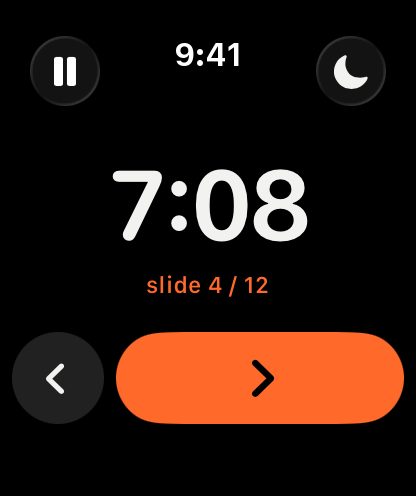
In short: with Remolo Pro, Apple Watch becomes a clicker for your talk: a big timer or stopwatch, ‹ › buttons, and the Crown flips slides. ☾ turns on the curtain on the Mac. The watch works through the iPhone, so the phone can stay in your pocket.
Updated
What you need
- An Apple Watch on watchOS 11 or later, paired with the iPhone.
- An iPhone with Remolo, connected to the Mac with the presentation.
- Remolo Pro.
Step by step
Connect the iPhone to the Mac
As usual: Remolo Helper on the Mac, Remolo on the iPhone, a code once.
Open Remolo on the watch
Pick a stopwatch or a countdown — set the minutes with the Crown.
Advance
The Crown or ‹ › — next and previous slide. The talk time is always in sight in big digits.
Together with the iPhone
Meanwhile the phone shows speaker notes from Keynote or PowerPoint, and buzzes quietly 2 minutes before the limit. The Lock Screen and the Dynamic Island show the timer with ← → buttons.
Honest limits
- The watch controls through the iPhone: the iPhone has to be nearby and connected to the Mac.
- The Apple Watch app is part of Remolo Pro.
Questions
Which presentations can I advance?
Keynote, PowerPoint, Google Slides, PDFs in Preview — anything that advances with the arrow keys.
Is there a buzz before time is up?
Yes: with a time limit the iPhone buzzes quietly 2 minutes before the end.
More guides
- How to control a Mac mini from your iPhone, at home and remotely
- How to check from your phone whether Claude Code has finished
- How to use your iPhone as a trackpad for your Mac
- How to advance Keynote and PowerPoint slides from your iPhone
- How to get a file from your Mac when you are not at home
- How to turn your iPhone into a Stream Deck-style button panel for your Mac
- How to control a Mac from your iPad
- How to control films and music on your Mac from the sofa
- How to lock or sleep your Mac from your iPhone
- How to type and dictate text on your Mac from your iPhone
- How to give someone temporary access to your Mac