How to control films and music on your Mac from the sofa
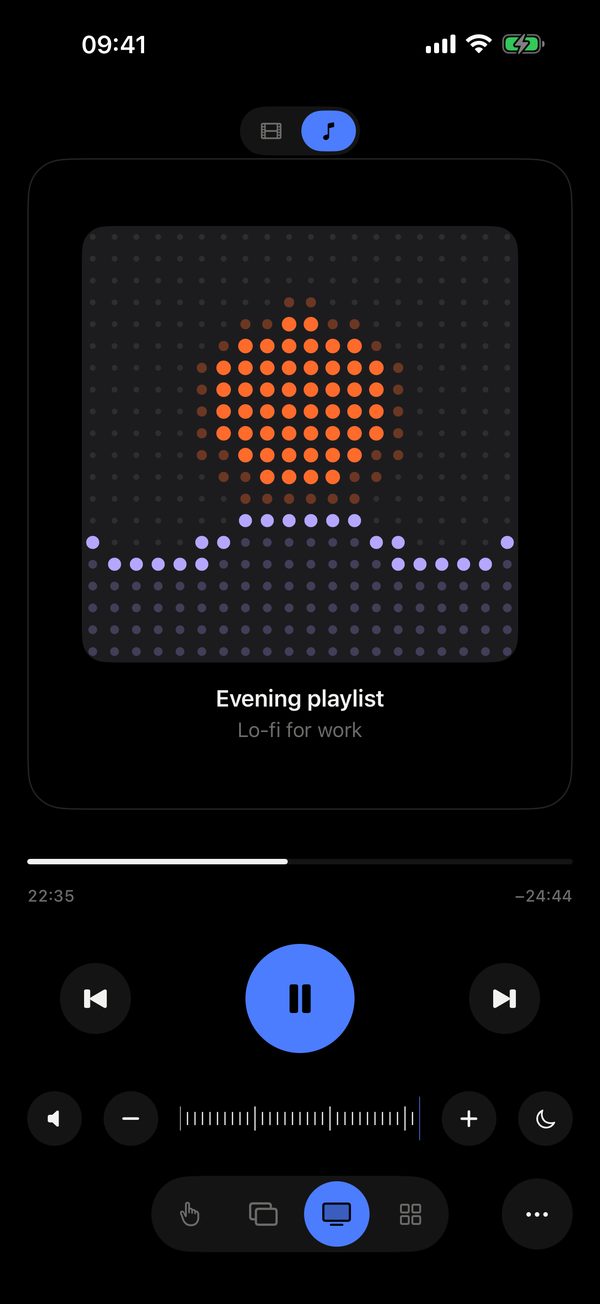
In short: open the Cinema mode in Remolo and pick Film or Music: tap to pause, swipe to skip 10 seconds in a film or to the next track in music, up and down for volume, double tap for full screen. Artwork and title come from any player, even YouTube in a browser. It is free; Remolo Pro adds a scrub bar and a sleep timer.
Updated
What you need
- A Mac with Remolo Helper and any player: Music, TV, Spotify, VLC, YouTube or Netflix in a browser.
- An iPhone or iPad with Remolo on the same network.
Step by step
Start a video or music on the Mac
Any player: Remolo sees what is playing.
Open Cinema
At the top pick Film or Music — the gestures adapt.
Control without looking
The whole phone screen is one big button: tap, swipe, up and down. A double tap makes the video full screen, and there are subtitles too.
What Pro adds
- A scrub bar to jump anywhere.
- A sleep timer for 15–120 minutes: the Mac pauses playback and goes to sleep.
- The “Now playing on Mac” widget and a play/pause control in Control Center.
Honest limits
- Remolo controls the Mac — it doesn’t stream the video to the phone.
- The scrub bar and the sleep timer are part of Remolo Pro.
Questions
Does it work with Netflix and YouTube in a browser?
Yes: tap, skip and volume work, and artwork and title show up even from YouTube in a browser.
What if the Mac is connected to a TV?
That is exactly what Cinema is for: you watch the TV and the phone in your hand is the remote. Need the cursor too — switch to the trackpad.
More guides
- How to control a Mac mini from your iPhone, at home and remotely
- How to check from your phone whether Claude Code has finished
- How to use your iPhone as a trackpad for your Mac
- How to advance Keynote and PowerPoint slides from your iPhone
- How to get a file from your Mac when you are not at home
- How to turn your iPhone into a Stream Deck-style button panel for your Mac
- How to control a Mac from your iPad
- How to advance slides from your Apple Watch
- How to lock or sleep your Mac from your iPhone
- How to type and dictate text on your Mac from your iPhone
- How to give someone temporary access to your Mac