How to turn your iPhone into a Stream Deck-style button panel for your Mac
In short: open the Buttons mode in Remolo: each button launches an app, a website, a shortcut, text, a media or system action on the Mac — in one tap. 6 buttons are free; Remolo Pro adds unlimited buttons on pages, profiles that switch with the app in front on the Mac, chains of actions, photos and GIFs, AppleScript and Shell.
Updated
What you need
- A Mac with Remolo Helper and an iPhone or iPad with Remolo.
- For more than 6 buttons, profiles, chains and scripts — Remolo Pro.
Step by step
Open Buttons
In Remolo switch to the Buttons mode — a starter set is already there.
Add a button
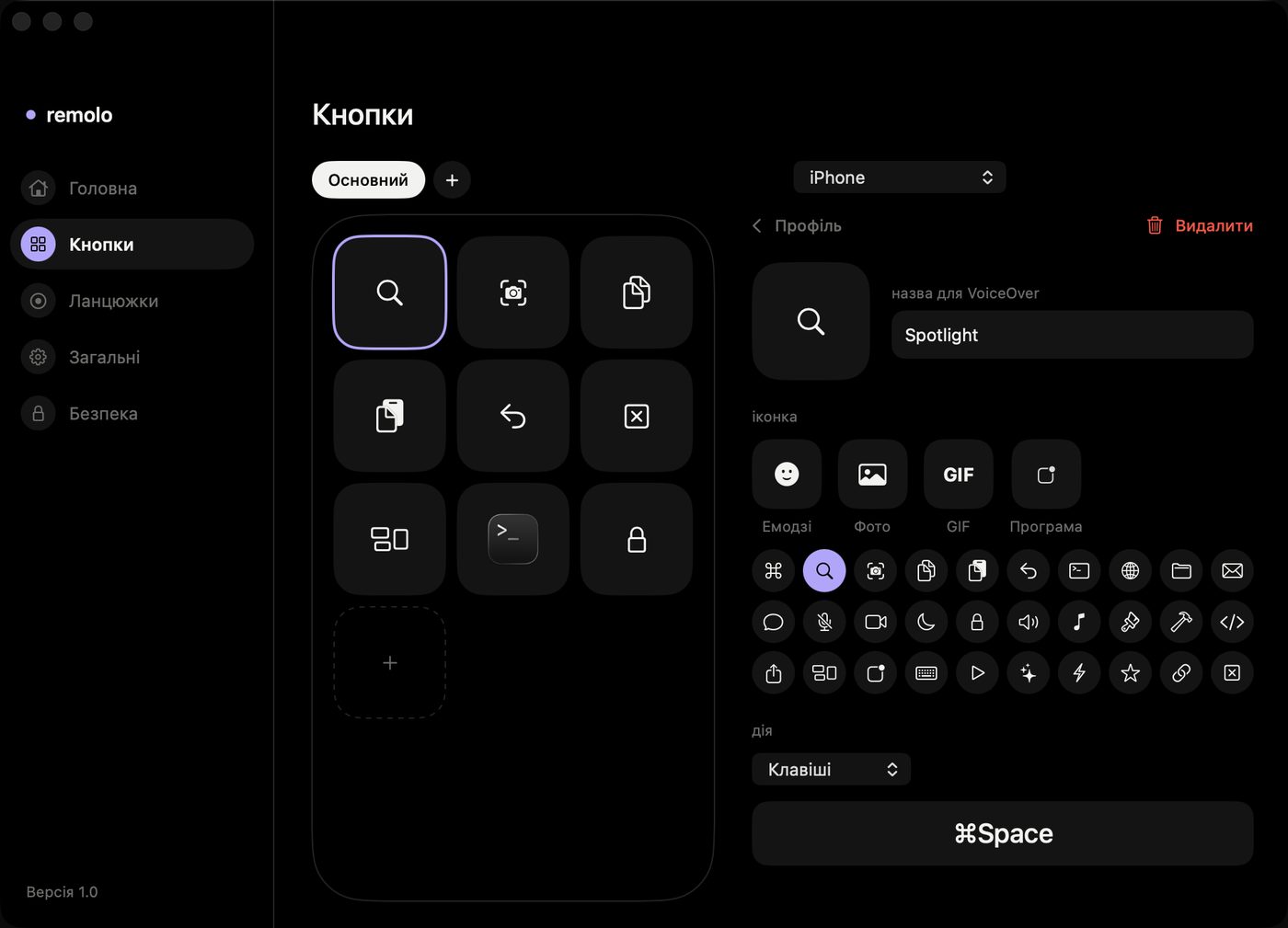
Pencil → “+”. Pick an icon (a symbol, an emoji, and in Pro a photo or GIF) and an action: keys, an app, a file or link, text, system, media.
Or set it up with a mouse on the Mac
Remolo Helper → the Remolo window → Buttons: the same editor on a big screen, and changes appear on the phone at once.
Make a routine one button (Pro)
A chain runs several actions in a row with pauses between them. Build it by hand or record it on the Mac: click “Record chain” and do your usual routine.
Profiles for apps (Pro)
A profile can be tied to an app: open Figma and the phone shows your Figma buttons; switch to Final Cut Pro and its buttons appear. There is a gallery of ready-made profiles: Figma, Keynote, Photoshop, Final Cut Pro, a browser, VS Code, Finder and Spotify.
Buttons without opening the app (Pro)
A Home Screen widget holds up to 8 buttons; any button can go into Control Center or on the iPhone’s Action button, or be pressed by voice: “Press … in Remolo”.
Honest limits
- Free: 6 buttons in one profile; pages, profiles, chains, photos and GIFs, AppleScript, Shell and Shortcuts are in Pro.
- Scripts run any code on the Mac, so they only work when the Mac allows them (Settings → Security in Remolo Helper).
- Siri understands Remolo phrases in English only.
Questions
How is this different from a Stream Deck?
A Stream Deck is a separate device with physical keys. Remolo uses the phone you already carry and also works over the internet (Pro) — but its buttons are on a touchscreen, not physical keys.
Can a button paste a text template?
Yes: the Text action types the text you set into the active field on the Mac.
More guides
- How to control a Mac mini from your iPhone, at home and remotely
- How to check from your phone whether Claude Code has finished
- How to use your iPhone as a trackpad for your Mac
- How to advance Keynote and PowerPoint slides from your iPhone
- How to get a file from your Mac when you are not at home
- How to control a Mac from your iPad
- How to control films and music on your Mac from the sofa
- How to advance slides from your Apple Watch
- How to lock or sleep your Mac from your iPhone
- How to type and dictate text on your Mac from your iPhone
- How to give someone temporary access to your Mac