How to advance Keynote and PowerPoint slides from your iPhone
In short: open the Slides mode in Remolo: tap right for the next slide, left for the previous one, hold a finger and the Mac’s screen goes dark. It works with Keynote, PowerPoint, Google Slides and Preview (PDF), free — with a stopwatch. Remolo Pro adds a countdown with a silent buzz 2 minutes before the end, speaker notes from Keynote and PowerPoint, a laser, spotlight, marker and Apple Watch.
Updated
What you need
- A Mac with the presentation and the free Remolo Helper.
- An iPhone or iPad with Remolo, paired with that Mac beforehand.
- A shared Wi‑Fi network — or Wi‑Fi and Bluetooth on both devices if the venue has none.
Step by step
Pair the phone before the talk
Install Remolo Helper on the Mac, allow Accessibility and enter the code from the Mac’s screen in Remolo. From then on the phone finds this Mac by itself.
Open the presentation
Keynote, PowerPoint, Google Slides in a browser or a PDF in Preview — anything that advances with the arrow keys.
Switch to Slides and start the show
The Start show button goes full screen, and the stopwatch starts with the first slide.
Advance
Tap right for next, left for back, or swipe. Hold a finger and the curtain hides the slide, so the room looks at you.
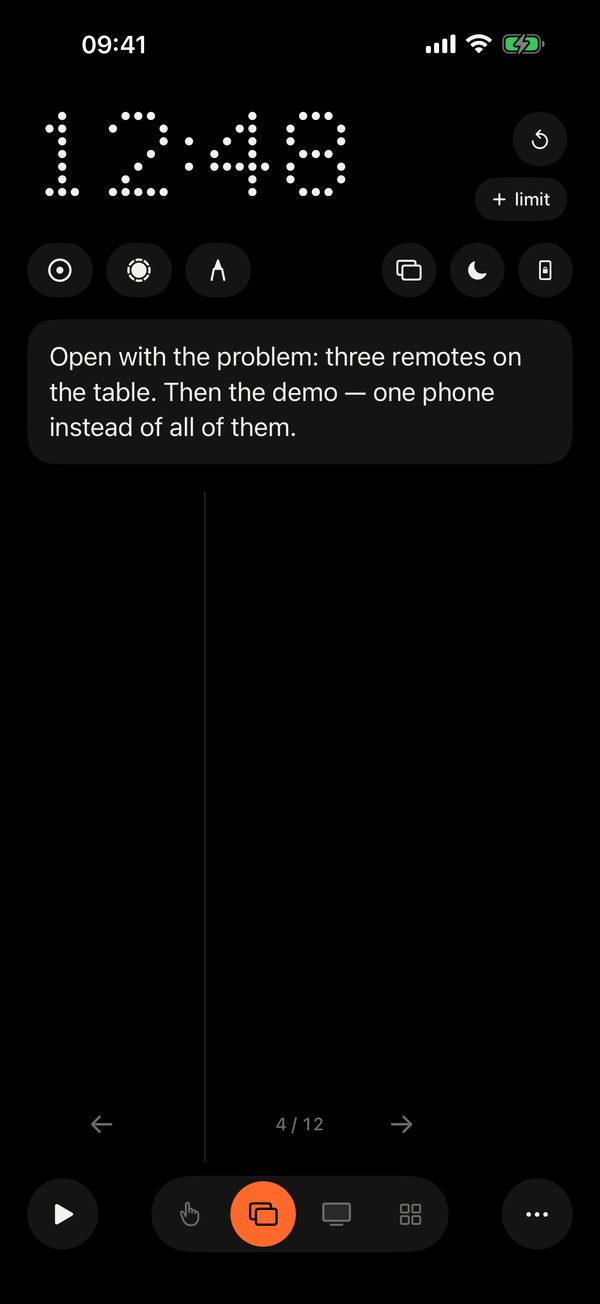
What Pro adds
- A time limit: the phone buzzes quietly 2 minutes before the end.
- Speaker notes from Keynote and PowerPoint on the phone.
- A laser (aim the phone), a spotlight and a marker in 7 colours.
- Pocket mode: advance with the volume buttons without taking the phone out.
- Apple Watch: a timer, ‹ › and the Crown flipping slides.
- Your own photo or video as the curtain instead of a black screen.
Speaker notes
To read the notes, the Mac asks once for permission to control Keynote or PowerPoint — click Allow. If you decline, the notes won’t appear: turn Remolo Helper on in System Settings → Privacy & Security → Automation.
Honest limits
- Speaker notes come only from Keynote and PowerPoint — not from Google Slides or PDFs.
- The countdown, notes, laser, spotlight, marker and Apple Watch are part of Remolo Pro; advancing, the stopwatch and the black curtain are free.
Questions
Does it work without Wi‑Fi in the venue?
Yes: turn on Wi‑Fi and Bluetooth on the phone and the Mac — Remolo connects directly, without a router.
How is this different from the remote built into Keynote?
Keynote’s built-in remote is free and works only with Keynote. Remolo also drives PowerPoint, Google Slides and PDFs, and doubles as a trackpad and remote for the whole Mac. More in the comparison.
What if the phone dies mid-talk?
The Mac stays an ordinary Mac: advance with the keys or the trackpad. Remolo changes nothing in the presentation.
More guides
- How to control a Mac mini from your iPhone, at home and remotely
- How to check from your phone whether Claude Code has finished
- How to use your iPhone as a trackpad for your Mac
- How to get a file from your Mac when you are not at home
- How to turn your iPhone into a Stream Deck-style button panel for your Mac
- How to control a Mac from your iPad
- How to control films and music on your Mac from the sofa
- How to advance slides from your Apple Watch
- How to lock or sleep your Mac from your iPhone
- How to type and dictate text on your Mac from your iPhone
- How to give someone temporary access to your Mac